
 Krasimir Kazakov
4383649306
docs: clarify the stylized icon policy |
1 tydzień temu | |
|---|---|---|
| android | 1 tydzień temu | |
| assets | 1 tydzień temu | |
| docs | 1 tydzień temu | |
| lib | 1 tydzień temu | |
| test | 1 tydzień temu | |
| tool | 1 tydzień temu | |
| .gitignore | 1 tydzień temu | |
| .metadata | 1 tydzień temu | |
| AGENTS.md | 1 tydzień temu | |
| README.md | 1 tydzień temu | |
| analysis_options.yaml | 1 tydzień temu | |
| pubspec.lock | 1 tydzień temu | |
| pubspec.yaml | 1 tydzień temu |
README.md
CarDash
A calm, configurable Android car dashboard launcher, built with Flutter.
CarDash replaces the tablet home screen with one landscape page: a large clock, battery and Wi-Fi status, the main media-volume control, and up to 16 buttons — Navigation, Music, Radio, Settings, All apps, plus any apps you pin from All Apps. The first three can be shown, hidden and assigned to installed apps. External apps open full-screen using the normal Android launcher mechanism. No overlays, no root, no kiosk setup.
Verified on Android 15 and Android 10 tablet emulators at 1280×800 and 1024×600. Runs on a physical Android 17 HyperOS tablet. Landscape only.
Screenshots
| Light | Dark |
|---|---|
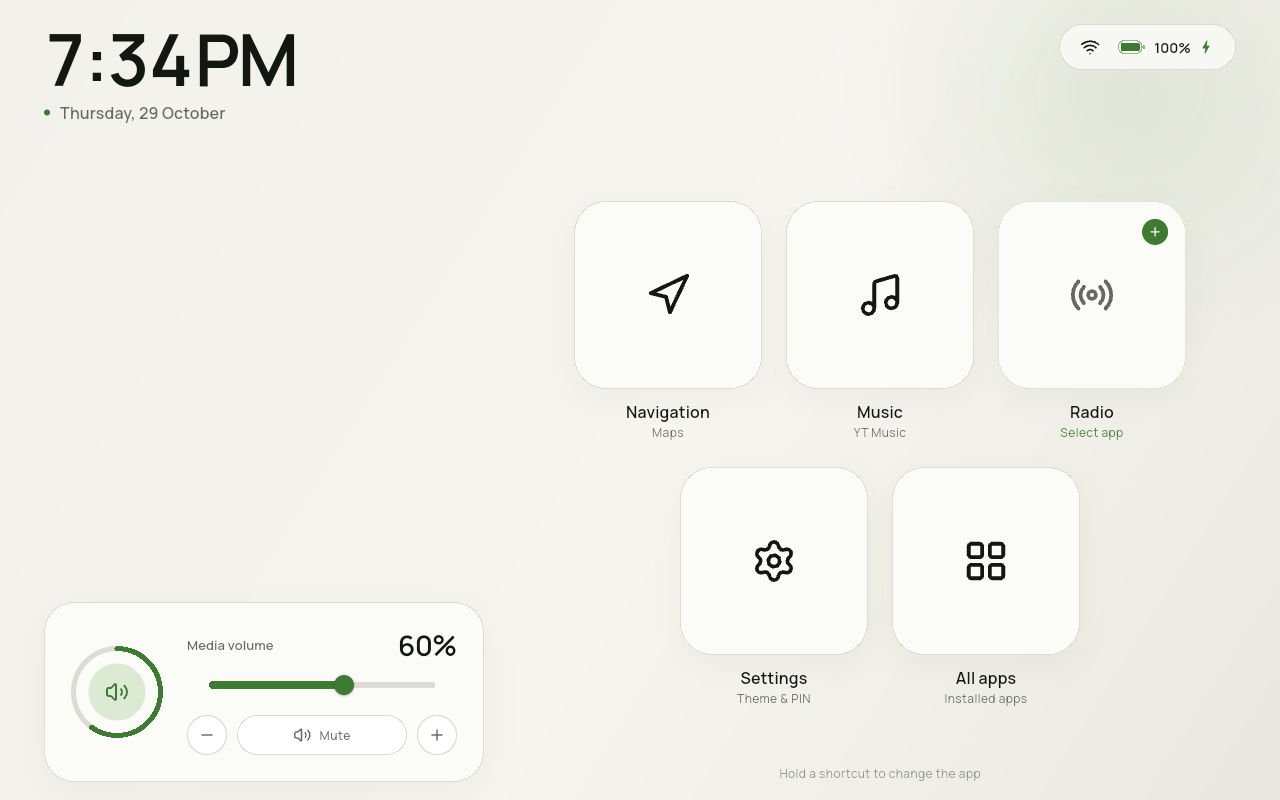 |
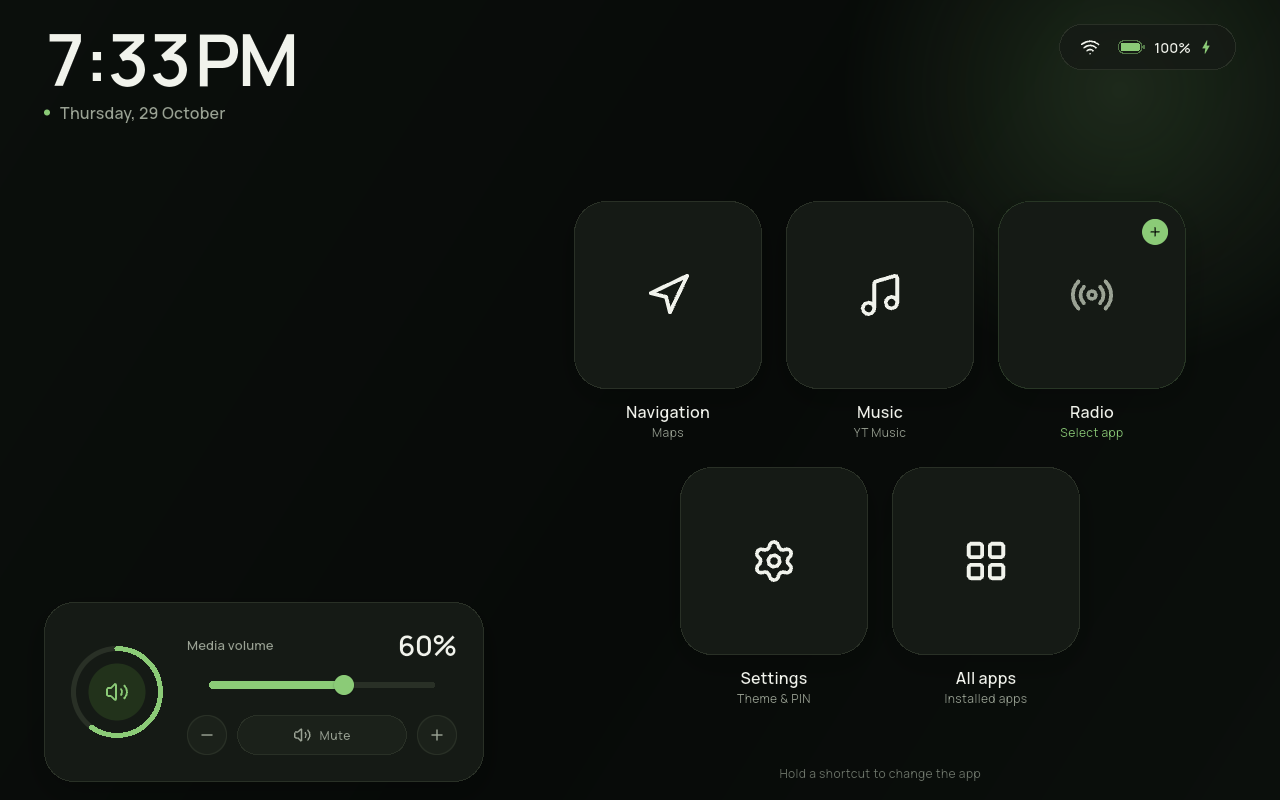 |
Also: 16-button home · 16 buttons at 1024×600 · All apps · app picker · Settings · accent & buttons · Blue accent · user-app icon on Home · pinned-app menu · change-icon grid · PIN lock · 1024×600 layout


Features
- One home screen — no pages, no top bar, no bottom dock; information and controls live on the home page.
- Large clock and date with the device's 12/24-hour preference.
- Battery, charging and Wi-Fi status, with one switch to hide the battery level and charging bolt.
- Media volume — ring, slider, step and mute controls. While CarDash is in front, the hardware volume keys are routed to the same media stream, so the dashboard and the keys always agree. This is the phone's media stream, not a private volume.
- Configurable home buttons — switches in Settings show or hide Navigation, Music and Radio. Settings and All apps are always the last two buttons. The fixed buttons and predefined slots always use the stylized line icons.
- Pin any app from All Apps — long-press an app to add it to Home. The home page holds up to 16 buttons including Settings and All apps, and the grid shrinks as it fills.
- Edit a pinned app — long-press it on Home for Rename, Change icon and Remove. Pinned apps show their own icon by default. Rename changes only the Home label; Change icon offers Default plus 29 monochrome line icons (white on dark, black on light); Remove takes effect without confirmation. Re-add the app from All Apps.
- One-time launcher tip — the first run shows a short notification that the default-launcher setting lives in Settings. It is not shown again.
- All apps — searchable grid of every launchable app, launched full-screen.
- Media-aware Music tile — while media audio is active and the Music shortcut is assigned, the stylized music icon shows a small animated equalizer. Android exposes media-active state, not the playing package, to a normal launcher; see the limitation below.
- Six accent colors — Green, Blue, Amber, Rose, Violet or Teal, applied across the whole interface.
- Screen stays awake while CarDash is in the foreground.
- A short onboarding hint — the long-press hint fades away two minutes after app start, then stays gone.
- Light / Dark / Automatic theme. Automatic uses a fixed local-time window (default 19:00–07:00), editable in Settings.
- Optional PIN — four digits, stored as a salted PBKDF2 hash in Keystore-backed storage. It is requested only when the launcher process cold-starts, never when returning from an app.
- Standard Android home role — no special overlays or permissions.
- Android 10+, landscape-only, tablet-first (verified at 1280×800).
- No network permission, no accounts, no telemetry, no T&C screen.
Requirements
- Flutter 3.47.8 / Dart 3.13.7 (or a compatible newer stable release)
- Android SDK 36, build-tools 36
- JDK 21 for Gradle (the machine default is JDK 27, which is not validated)
- Android 10 (API 29) or newer device/emulator
- A landscape tablet or an emulator; the app locks itself to landscape
- The prepared tablet AVDs use the host GPU; a working GPU driver is recommended
The Android application ID is com.wasp.cardash_launcher. Android package
segments cannot contain hyphens, so the requested com.wasp.cardash-launcher
spelling is normalized to an underscore.
export JAVA_HOME=/usr/lib/jvm/java-21-openjdk
export ANDROID_HOME=/opt/android-sdk
export PATH="$ANDROID_HOME/platform-tools:$PATH"
Quick start
flutter pub get
./tool/check.sh

# Boot the prepared 10.1" 1280×800 Android 15 tablet (headless)
./tool/emulator.sh 35

# Build, install, and make CarDash the HOME app
./tool/install.sh debug
If the emulator does not yet exist on another machine, create it with:
sdkmanager "system-images;android-35;google_apis;x86_64"
avdmanager create avd -n cardash_tablet_api35 \
  -k "system-images;android-35;google_apis;x86_64" \
  -d "10.1in WXGA (Tablet)"
The repository also has an Android 10 AVD (cardash_tablet_api29) for
minimum-version checks.
Manual install
flutter build apk --release
adb install -r build/app/outputs/flutter-apk/app-release.apk
adb shell cmd role add-role-holder android.app.role.HOME com.wasp.cardash_launcher
adb shell am start -a android.intent.action.MAIN -c android.intent.category.HOME
On a real tablet, use Settings → General → Home app → Set as default and accept the system prompt. Android will not let an app force itself into the home role silently. CarDash no longer keeps a home-role banner on the dashboard; the first run shows a one-time tip pointing to this setting.
Using CarDash
| Action | Result |
|---|---|
| Tap Navigation / Music / Radio | Open the assigned app full-screen |
| Long-press Navigation / Music / Radio | Pick a different installed app |
| Tap an unassigned shortcut | Open the app picker |
| Settings → Accent | Pick Green, Blue, Amber, Rose, Violet or Teal |
| Settings → Battery & charging | Show or hide battery level and charging bolt |
| Settings → Home buttons switches | Show or hide Navigation, Music, Radio |
| Long-press an app in All Apps | Add it to Home (up to 16 buttons) |
| Long-press an added app on Home | Rename, Change icon or Remove |
| Settings | Theme, accent, battery, home buttons, default-home role, PIN |
| All apps | Search every launchable app; tap to open, hold to pin |
| Music tile while media is active | Shows the selected app icon + equalizer |
| Screen | Stays awake while CarDash is in front |
| Volume ring / mute | Toggle media mute |
| Slider or − / + | Set media volume |
| Hardware volume keys | Adjust the dashboard's media volume; the ring follows |
The app hides the Android status and navigation bars while CarDash is in the foreground. Swipe from an edge to reveal them temporarily; they hide again when the app resumes.
Settings
General
- Light / Dark / Auto theme.
- Accent: Green, Blue, Amber, Rose, Violet or Teal.
- Battery & charging: one switch hides both the level and charging bolt.
- Auto night window (default dark from 19:00, light from 07:00).
- Home buttons: show/hide Navigation, Music, Radio; live count out of 16.
- Assign the app for each slot; Settings and All apps are fixed and last.
- Home role status and shortcut to the system prompt.
Security
- Set, change or remove a four-digit PIN.
- The PIN is requested only on a cold start. It does not re-lock when switching apps, after screen-off, or after returning from Navigation. This is the agreed behavior, not an oversight.
- The PIN protects the launcher UI. It is not the Android lock screen; set a device screen lock separately for device-level security.
- There is no PIN recovery. Resetting app data removes it.
Architecture
lib/
  core/        design tokens, theme controller, icons, shared widgets
  data/        models, platform services, SettingsRepository (single source of truth)
  features/
    home/      home page, shortcut grid, volume card, controllers
    apps/      All Apps, app-picker sheet
    settings/  General + Security
    lock/      PIN pad, cold-start lock screen
android/...    MainActivity, LauncherBridge, SystemBridge (Kotlin)
tool/          emulator, install, check scripts
docs/          implementation plan, design notes
- Flutter owns all UI. Kotlin only exposes package enumeration/launching, the
HOME role, battery/Wi-Fi and media volume over two
MethodChannels. SettingsRepositoryis the only persistence path. Controllers areChangeNotifiers injected withprovider.- External apps are separate activities; Android has no public API to embed them inside the launcher. This app deliberately accepts full-screen launching for maximum compatibility.
Testing
flutter analyze
flutter test
./tool/check.sh
The 23 tests cover PIN hashing/persistence, settings persistence, theme and accent resolution, battery visibility, first-run state, slot visibility, pinned apps, custom labels/icons, the 16-button cap, the dense shortcut grid and the equalizer animation. Native package enumeration, system/user app flags, the HOME role, volume, app launching and PIN flows were verified on API 35 and API 29 emulators, including the release APK. The home-button, pinning, menu, custom-icon, user-icon and keep-awake flows were checked at 1280×800 and 1024×600. Release 0.4.0 is installed on the emulator and the physical Android 17 HyperOS tablet.
Troubleshooting the emulator
The prepared AVDs use the host GPU (-gpu host), which is the verified setup on
this machine. Software rendering with SwiftShader segfaulted on the API 35 image.
If your machine has no usable GPU, you can try:
CARDASH_GPU=swiftshader_indirect ./tool/emulator.sh 35
The prepared AVD resolution is 1280×800. If the emulator is already running,
./tool/emulator.sh stop shuts it down before starting a different one. The
Android 15 AVD is left running headlessly after development; use
./tool/emulator.sh 35 window for a visible window.
Compatibility and limitations
- minSdk 29 (Android 10); compile/targetSdk 36. Nothing in the design requires a newer Android release.
- Landscape only (
sensorLandscape). The home page is designed for 1280×800 and remains usable at 1024×600. - 16-button cap includes Settings and All apps. Only apps pinned from All Apps show an original app icon by default; the predefined slot buttons, Settings and All apps stay stylized. A pinned icon can be replaced with the Default app icon or the 29 stylized choices.
- Media equalizer reacts to system media activity, not a per-app media session. Android does not expose the playing package to a normal launcher without notification access; adding that permission is deliberately out of scope for now.
- Screen-on applies while CarDash is the foreground window. Android can still sleep while another app is in front.
- Onboarding hint is anchored to process start and disappears after two minutes; it does not return until the next cold start.
- No embedded third-party app UI. Navigation/Music/Radio are launched in their own full-screen windows.
- Renaming changes the Home label only. Android does not allow a launcher to rename another app's installed label.
- Custom icons are bundled monochrome SVGs, so they follow the light/dark theme. Default restores the pinned app's own icon.
- No global play/pause control. Volume is on the home screen; playback buttons live in the media app itself.
- No weather, Bluetooth, calls or climate in this version.
QUERY_ALL_PACKAGESis used to list all launchable apps. It is reasonable for a launcher but requires a Play policy declaration if the app is ever distributed; this is a local/sideload build for now.- No internet permission. The app does not fetch maps, weather or updates.
- The launcher cannot replace Android's lock screen. The PIN does not protect a running session, by design.
Design
The visual language is inspired by the TrailCurrent Godwit head unit (MIT): warm neutral surfaces, a selectable instrument accent, large numerals and quiet line icons. It is not a copy of that UI.
- Typeface: Manrope (SIL Open Font License), bundled offline.
- Icons: Lucide (ISC), bundled as SVGs.
- Palette and tokens:
lib/core/theme/app_colors.dart.
Roadmap
- Optional compact now-playing control beside the volume card.
- Exact per-app media detection via notification access, if desired.
- Release signing configuration.
- Real-device soak test on an Android 10 car tablet.
License
This repository is in local development and has not been pushed or published. A project license has not been chosen yet. Third-party asset licenses: Manrope (OFL) and Lucide (ISC). The design is inspired by TrailCurrent Godwit (MIT).